Storage
BattleTime keeps its files, settings and logs in the external flash with battletime-flash-store
(services/flash_store/). flash-store.md describes the store itself: its files,
records and logs, how it survives a power cut and what it costs. This page says what the watch
keeps there and how the firmware reaches it.
Where it lives
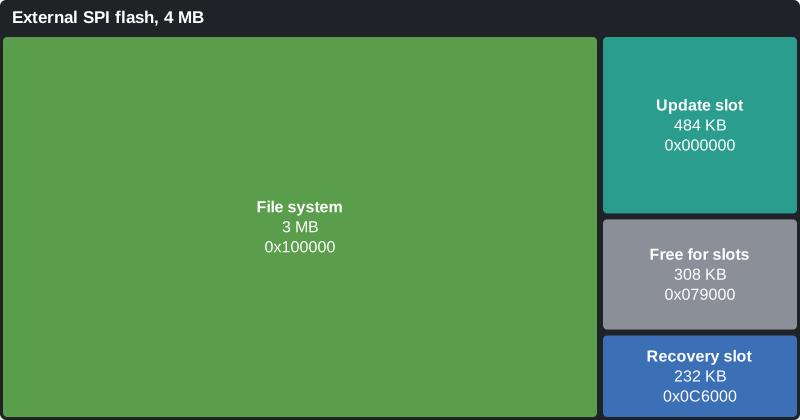
The store has the FILE_SYSTEM region of the external flash to itself: 3 MB from 0x100000. It
gives 2 MB to files, 256 KB to records and 768 KB to logs. The region before it holds the firmware
update and recovery slots, which the bootloader reads as raw flash; see
bootloader.md.
What the watch keeps
The store has no folders: a path's slashes only name it, and a folder is the files whose paths start with it. The Files app lists them that way, a folder at a time with each file's size. Files of 1 KB or less are kept as records, so most of these cost no sector of their own.
Apps
| Path | Holds |
|---|---|
/apps/<id>/app.ntapp |
the compiled app or watch face, as battletime-compiler writes it |
/apps/<id>/state |
what the app saved, written by the shell when the app closes or the screen turns off; the alarm app's alarms and the sports app's last sessions are kept here |
/apps/<id>/disabled |
present when the app is installed but turned off |
/temp/<id>/ |
a temporary app's image and data files, which the phone writes and deletes; see companion-protocol.md |
Settings
| Path | Holds |
|---|---|
/settings/system |
the watch-wide settings, each one byte naming the setting and a little-endian i32 (see services.md) |
/settings/theme |
the theme's eight RGB565 colours |
/settings/time_zone |
the zone a phone last set, as the two bytes of Local Time Information |
/settings/launcher |
the launcher's style, view and groups, which the companion writes |
/settings/quick_apps |
the face's ring of quick apps, one id a line, which the companion writes |
Files the companion writes for apps
| Path | Holds |
|---|---|
/notes/note.txt and /notes/font |
the note, and the font to show it in |
/qr/list and /qr/<slot> |
the QR codes' captions, and each code as a 1-bit bitmap |
/remote/buttons |
the remote app's buttons |
Their formats are in companion-protocol.md.
Logs
Each log holds one value for each six-minute slot from local midnight, written as each slot ends.
The days are kept in blocks, blank files of one sector holding whole days, block n starting n
blocks of days after 1970-01-01. Each slot is programmed into its place in its block, so a slot
costs no erase, only a new block does, every 8 or 16 days. Each byte is stored flipped by its log's
mask, so a slot never written reads as the empty value. A block is deleted once all its days are
older than 90 days. battletime-slot-log (services/slot_log/) names the blocks, writes the slots
and forgets old days for all three.
| Path | Holds |
|---|---|
/day_blocks/steps/<n> |
8 days of steps, a u16 a slot, each byte flipped |
/steps/trip |
the trip count, a u32, saved when a day ends and when the screen goes dark |
/day_blocks/heart/<n> |
16 days of average heart rate, a byte a slot, flipped, so an unwritten slot reads 0 |
/day_blocks/battery/<n> |
16 days of battery charge at the end of each slot, the top bit set while charging, unflipped, so a slot the watch was off reads 0xff |
Older firmware kept each day as a file of its own, /steps/<year>/<month>-<day>,
/logs/heart/<year>/<month>-<day> and /logs/battery/<year>/<month>-<day>, rewritten whole at
every slot and each taking a record key. Those files stay and are read beside the blocks until
they are older than 90 days.
The battery task ends each slot: it takes the heart rate task's average for the slot and its own charge, and the storage task writes both. The companion reads the blocks with the file transfer, or copies their days on each sync; the layout of each is in companion-protocol.md.
How the firmware reaches it
- Mounting. At start the firmware mounts the store in place, by polling the chip, so start-up's task never holds a copy of it. A store of another format version is refused and the status page says so, rather than overwriting it. Blank flash, or flash littlefs once used, mounts empty.
- The storage task alone awaits the store. The Bluetooth task's file transfers, the packages
commands, the step, heart rate and battery logs and small files such as the time zone reach it
as requests (
firmware/src/storage_requests.rs), one at a time. Its erases and page programs are started and then waited on with the timer, so the CPU and other tasks run while the chip works. - The shell calls the store directly, without awaiting, once no request is under way, so its
reads and writes always find the store free. These calls poll the chip, resting a moment
between polls, so they block the CPU while an erase runs. The storage task calls the store's
prepare_roomafter every request and when the screen goes dark, which erases the sector the rings will need next and cleans the records ring ahead of time, so the shell's writes usually only program pages. Closed apps' timers run only once no store write is under way. - Reads by DMA. The flash shares its SPI bus with the screen. Reads move by EasyDMA, up to
255 bytes a piece, in the moments the display leaves the bus free, such as while the next strip
is drawn, and stop after the current piece whenever the display asks for the bus, so they never
slow drawing by more than one piece. The store's
file_extentssays where a part of a file lies, so the firmware reads it straight from the flash; a file kept as a record is read at once instead. - Reading ahead. An app reads a file larger than its memory a part at a time:
file_bytes(path, length, offset)reads from an offset, and theprefetch_fileeffect starts reading up to 4 KB of a file in the background, which the nextfile_bytesof that part takes from RAM. The diagnostics count the bytes moved by DMA, the pauses for the display and the reads served from a part read ahead; see companion-protocol.md. - Sleeping the chip. While the screen is off the flash goes into deep power-down, once the store is idle, and wakes before its next command. The driver also wakes it at start, since a reset may have left it asleep.
- The update slots are read and written outside the store, through the same driver, which makes either wait for the other.
See firmware.md for how the tasks fit together.