Phone features
The companion passes what the phone knows on to the watch: notifications, calls, music, the weather and the time. On a computer the desktop app plays the phone's part with the computer's own notifications, media players and Do Not Disturb.
The switches are on the Notifications screen, under Forwarding:
| Switch | What it does |
|---|---|
| Forward notifications | Shows the phone's or computer's notifications on the watch |
| Calls | Shows incoming calls, and lets the watch answer, reject or mute them (phones only) |
| Now playing | Sends the playing track, and takes the watch's music controls |
| Weather | Sends the current weather every half hour |
| Respect Do Not Disturb | Holds back notifications and calls while the phone or computer is in Do Not Disturb |
Under Status the screen says whether the app has notification access, with Grant access to open the phone's setting, and whether Do Not Disturb is on.
On a phone and on a computer
| Feature | Android app | Desktop app (Linux) |
|---|---|---|
| Notifications | every app's notifications, once notification access is granted | desktop notifications, overheard as apps send them |
| Calls | incoming calls, answered, rejected or muted from the watch | none; the Calls switch is hidden |
| Music | the active media session | any MPRIS player: browsers, Spotify, VLC and the rest |
| Do Not Disturb | the phone's Do Not Disturb | KDE's, Cinnamon's, GNOME's or dunst's |
| Location for the weather | the phone's location | GeoClue, when it runs |
| The clock | the phone's | the computer's |
The Android app skips ongoing, media and call notifications and its own, and keeps itself running in the background with a small notification of its own.
Notifications
Each forwarded notification shows on the watch with its app's icon, and the watch's notification preview pops up as it arrives. A notification removed on the phone is removed from the watch too. Notifications shows them on the watch.
The Test notification quick action on the Watch screen sends a sample, to check the link.
Calls
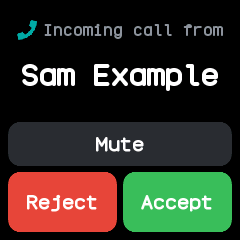
With Calls on, an incoming call opens the watch's call screen, which rings until the call is answered or ends. From the watch:
- Answer picks the call up (Android 8 and later);
- Reject ends it (Android 9 and later);
- Mute silences the phone's ringer for this call; the call keeps ringing and the ringer comes back when it ends.
When an incoming call ends, the watch gets a notification saying Missed call, Ignored call (rejected or muted on the watch) or Accepted call, with the caller's name. The caller's number needs the call log permission and the name needs contacts.
Music
With Now playing on, the watch's Music app shows the track, artist and whether it plays, and its buttons play, pause, skip and change the volume on the phone or computer. The Watch screen shows the same track with Previous, Play and Next.
Weather
The weather comes from Open-Meteo every half hour while the watch is connected, and on the Send weather quick action. Under Weather in Settings:
- type a town or city and choose Find this place; or
- switch on Use where this phone is (or computer), which asks the location service each time.
On a computer, the location comes from GeoClue; on NixOS that is services.geoclue2.enable = true.
The watch's Weather app shows what arrives.
The time
The companion sets the watch's clock and time zone each time it connects, again whenever the device's own clock jumps (set by hand, a new time zone, waking from sleep), and every six hours. The watch also reads the time from a phone that serves the standard Current Time service, with no app needed.
Finding the watch and the phone
- Find watch on the Watch screen makes the watch vibrate until it is touched.
- The watch's Finder app tells the companion it is looking, and the Watch screen then says The watch is looking for this phone. The companion shows this card but does not ring.
Navigation
The companion follows no navigation app yet, so when the watch's Navigation app asks, it answers that there is no route. The watch reads turn-by-turn directions in the form Gadgetbridge's Bangle.js driver sends them.
Using Gadgetbridge instead
With Show as InfiniTime on (the Bluetooth section of Watch settings in the companion), the watch advertises the name InfiniTime, so Gadgetbridge on Android offers its InfiniTime support: notifications, calls, the time, the heart rate, firmware updates and files. Gadgetbridge's music, navigation, weather and find features use InfiniTime services the watch does not serve yet.
Only one app can hold the watch at a time, and installing apps, sync and plugins need the companion.
Internet for watch apps
A watch app can ask the companion to fetch a web page. Internet for watch apps in Settings switches this on, lists the hosts allowed (each with its subdomains), and sends back only the first 1024 characters. With no hosts listed, every request is refused.